Appearance
Value Types
All operations on an ImageFlow graph happen on values. Values flow through the graph as inputs and outputs of nodes. Nodes take values as inputs, operate on them, and output other values.
Each value has a determined type. For instance, floating-point numbers are represented by Float typed-values, integer numbers are represented by Integet typed-values, and so on.
Each input slot of a node accepts only values of a determined type, and each output slot outputs values of a determined type.
Below we go through all available types in ImageFlow.
Basic Types
Float
The Float type represents double-precision floating point numbers.
Integer
The Integer type represents integer numbers.
Bool
The Bool type represents boolean values, with possible values being true and false.
Rect
The Rect type represents a rectangle in the 2D coordinate space. It represented by four floating-point numbers:
- The
xcoordinate of the bottom-left corner of the rectangle. - The
ycoordinate of the bottom-left corner of the rectangle. - The
widthof the rectangle. - The
heightof the rectangle.
Vector 2
The Vector 2 represents a two-dimensional vector, and consists of two floating-point values, the first being the x coordinate of the vector and the second the y coordinate of the vector.
Vector 3
The Vector 3 represents a three-dimensional vector, and consists of three floating-point values, namely, the x, y and z coordinates of the vector.
Vector 4
The Vector 4 represents a three-dimensional vector, and consists of four floating-point values, namely, the x, y, z and w coordinates of the vector.
Color
The Color type represents an RGBA color values, and consists of four floating point numbers that determine the value of each channel.
Image
The Image type represents an image on which operations can be performed. Images can either be generated by nodes, be output of nodes, or selected from the asset library.
String
The String type represents a sequence of characters.
Affine Transform
The Affine Transform type represents an affine transformation in 2D space.
An affine transformation can be used to encode combinations of various transformations such as translations, scaling, rotations, shearing, and reflections.
Affine Transform values consist of a 2 by 2 matrix and a two-dimensional translation vector.
Matrix 2x2
The Matrix 2x2 type represents a square [matrix] two columns and two rows.
Matrix 3x3
The Matrix 3x3 type represents a square [matrix] three columns and three rows.
Matrix 5x5
The Matrix 5x5 type represents a square [matrix] five columns and five rows.
Matrix 7x7
The Matrix 7x7 type represents a square [matrix] seven columns and seven rows.
Gradient Data
The Gradient Data type configures the look of gradients. See the documentation for the Gradient Data node for details on how to configure Gradient Data values.
Type Groups
Numeric Type
The Numeric is a group of types that can be targets of mathematical operations such as addition, subtraction, and multiplication.
Types that are part of Numeric Type are: Float, Integer, Color, Vector 2, Vector 3, Vector 4, Matrix 2x2, Matrix 3x3, Matrix 5x5, Matrix 7x7, and Affine Transform.
Divisible Type
The Divisible is a group of types that can be targets of the division operation.
Types that are part of Numeric Type are: Float, Integer, Color, Vector 2, Vector 3, and Vector 4.
Vector Type
The Vector group consists of types that support vector operations.
Types that are part of Vector are: Vector 2, Vector 3, and Vector 4.
Type Compatibility and Casting
Nodes in ImageFlow are strongly typed. That is, input ports have a given type and will, in general, only accept connections from output ports of that same type.
But there are two situations in which this rule is relaxed.
The first case is when one type can be type-casted (that is, converted) into another type.
For instance, integers can casted to floating-point numbers, so we can connect an Integer into a Float port:
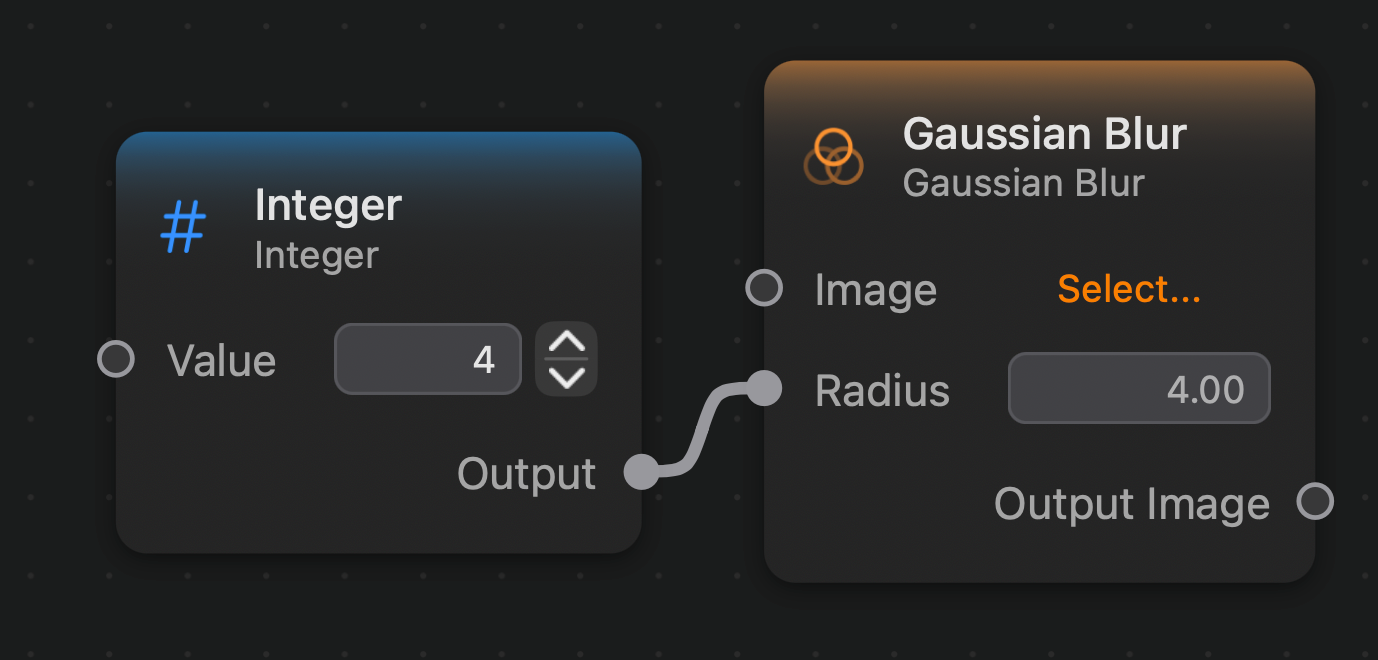
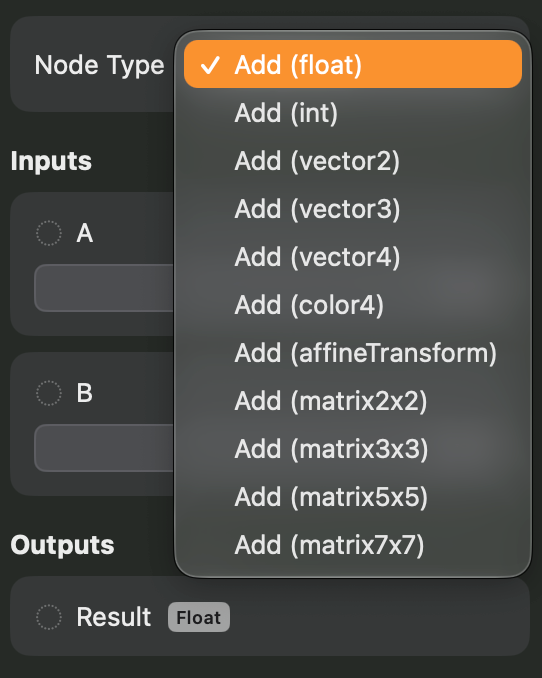
The second case is when a generic node can assume a desired type. Generic nodes are nodes that have variants that can operate on different types. For instance, the Add Node is generic and can operate on any type that belongs to the Numeric Type group. So that add node has variants like Add (int), Add (float), etc., as can be seen in the image below:

So when an Add (float) is placed on the canvas, we can connect, for instance, an Integer value into it, and it will automatically be converted to an Add (int) node:
This type of conversion will only happen when the node has no edges that will constraint the conversion. For instance, it the Add (float) node is already connected to another Float node the conversion will not occur:

In this case the node variant remains the same, Add (float). The connection is only allowed because of Integer to Float type casting.
Type Casting List
- Integer:
Float,Vector 2,Vector 3,Vector 4,Affine Transform,Bool,Color,Rectangle. - Float:
Integer,Vector 2,Vector 3,Vector 4,Affine Transform,Bool,Color,Rectangle. - Vector 2:
Integer,Float,Vector 3,Vector 4. - Vector 3:
Integer,Float,Vector 2,Vector 4,Color. - Vector 4:
Integer,Float,Vector 2,Vector 3,Color,Rectangle. - Rectangle:
Integer,Float,Vector 2,Vector 3,Vector 4.