Appearance
Canvas Inspector

The Canvas Inspector tab shows information and controls related to the ImageFlow canvas.
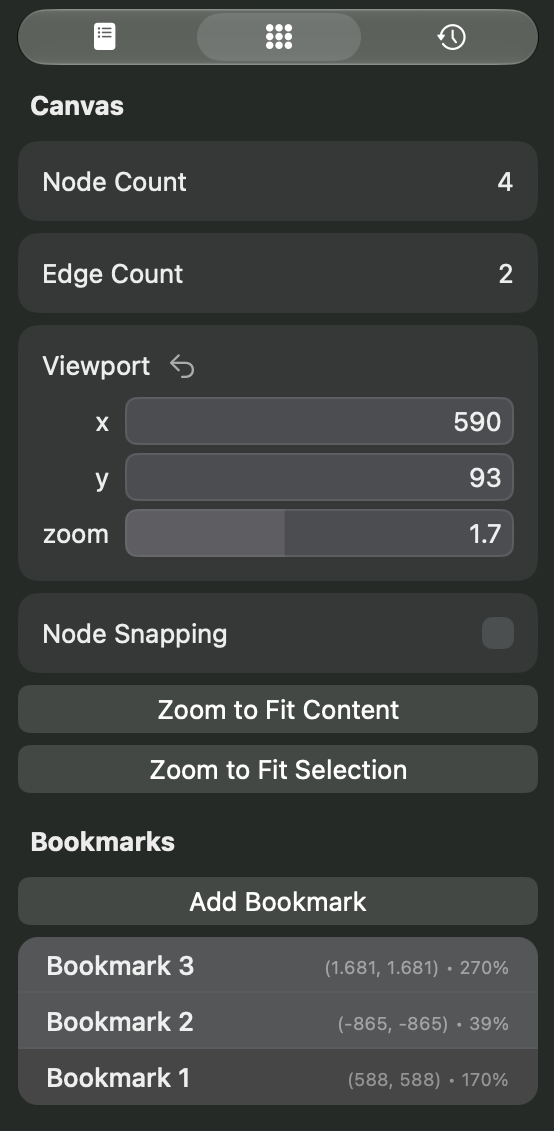
Here is a breakdown of its components:
- The Node Count displays how many nodes there are in the canvas.
- The Edge Count displays how many edges between nodes there are in the canvas.
- The Viewport block allows you to control the canvas' viewport. You can move the viewport to a specific position and change the zoom level to a desired value.

- The Node Snapping option controls if nodes should snap to the canvas' grid when dragged. This is the same as the toggle on the toolbar.
- The Zoom To Fit Content button will attempt to make the viewport show all nodes in the canvas.
- The Zoom To Fit Selection button will attempt to make the viewport show all selected nodes in the canvas.
- Next there is the Bookmarks block. It shows a list of the created bookmarks. Clicking the "Add Bookmark" button will add the current viewport as a bookmark. Clicking on a bookmark in the list will transport the viewport to the bookmarked position. Right-clicking on a bookmark will show a context menu that allows you to delete the bookmark or rename it.